

AI-Powered PUK Code Generator | AT&T Wireless USA
Fast & Reliable SIM PIN Unlock Service
Did you know you can unlock any AT&T SIM card instantly using artificial intelligence? Well, in UnlockHere, we provide a fast, secure, and hassle-free way to retrieve your Personal Unlock Key (PUK) in a matter of minutes and without complicated steps. Click below to generate your PUK code now!
If your AT&T SIM card is blocked due to too many incorrect PIN attempts, you’ll need a PUK (Personal Unlocking Key) code to regain access, but what happens if you don’t know that code either? Well, normally, customers have to contact AT&T’s customer support, but there are alternative ways to retrieve the code faster, which we will explore in this comprehensive guide. So, if you want to know how to get your SIM’s Unlock PUK Code AT&T, keep reading because we’ll show you in detail what you need to do and what is the perfect solution for this type of lock!
How do I get the PUK Code to Unlock an AT&T SIM Card?
A locked SIM card can be frustrating, especially when you rely on your AT&T phone for calls, messages, and mobile data, which everyone does because that’s exactly what cellular devices are. However, don’t worry because even if you forgot your PIN code, it is actually pretty easy to unlock your SIM card; in fact, all you need to do is either go find the SIM’s PUK code or get it directly from AT&T.
How can I find the PUK Code of an AT&T SIM Card?
How can I get my PUK Code directly with AT&T Wireless?
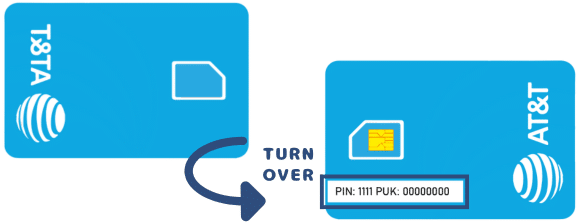
Your AT&T SIM’’s PUK is often included in the packaging that came with your SIM, so if you still have the original SIM cardholder (a plastic card with a punch-out slot for your SIM), you have the code. All you need to do is look for an 8-digit code printed near the card’s barcode, and once you have it, simply enter it into the phone to remove its SIM lock and regain access to the blocked SIM.
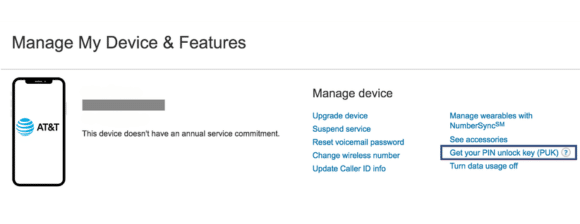
This is actually very easy because most carriers provide this information online so users can retrieve it easily, and AT&T is not the exception! You can get the PUK code to unlock your SIM from your “MyAT&T” account by going to Account Overview > My devices & add-ons > Manage my device > See device options, and selecting the “Get your Unlock key (PUK)” option.
How do I get a PUK Code for an AT&T SIM not Registered under my Name?
If your AT&T SIM card was registered under another person’s name—such as a family member, former employer, or previous account holder—getting the PUK code through AT&T won’t be possible. You can definitely try calling them at 800-901-9878 but anyway, they will require an account and identity verification, so they won’t get the PIN unlock key for you if your name doesn’t appear there.
In such cases, your best option is to use UnlockHere, a very fast and reliable platform that generates the PUK code for your SIM without requiring account credentials or AT&T’s approval. UnlockHere’s advanced technology allows users to unlock SIM cards quickly, all through artificial intelligence, which makes us one of the most effective methods on the internet, with a 99.9% success rate.
UnlockHere: The Solution for Blocked AT&T SIM Cards

In UnlockHere, we’re very proud to tell you that we’re the first ones to provide such an innovative, safe, and practical way to retrieve PUK codes for AT&T SIM cards, and best of all,! Unlike traditional methods that require contacting the carrier, downloading apps or APK files, or paying very expensive fees UnlockHere gives you a quick, easy, and pretty affordable solution. In addition, the process is fully automated, ensuring that you get the code in minutes rather than hours or days, all needing only the SIM’s phone number and country of origin!
Steps to get PUK Code with UnlockHere: Any Wireless Operator
If you’re ready to get rid of the SIM lock and simply generate a new PUK code for you to reaccess your chip’s network as normal, you’ve come to the right place because we’re definitely able to help. Let’s see the three-step tutorial you need to follow to unlock any prepaid or postpaid SIM card with us and don’t worry if it’s not from AT&T but another carrier like T-Mobile or Verizon, we can get the job done either way!
Step 1: Submit your Online Request
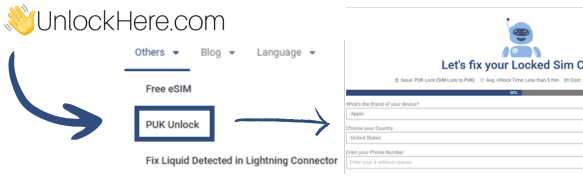
- Visit UnlockHere.com and select the PUK Unlock service.
- Enter your AT&T phone number, the brand of the device where the lock was triggered, and your country of origin.
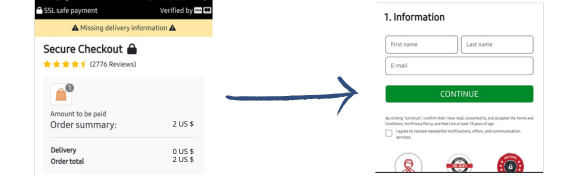
- Enter your name and email address as the order’s contact information.
- Submit your request.
Step 2: Pay the Fee for the Service
- Activate the order by clicking on the link in the confirmation email sent automatically after the submission.
- Create an account with UnlockHere to access our payment gateway.
- Make the two-dollar payment we charge as the unlocking service fee for us to get your PUK code.
Step 3: Receive and use your PUK Code
- Wait a couple of minutes while Nifty, our AI-powered assistant obtains your PUK code based on our software and algorithms.
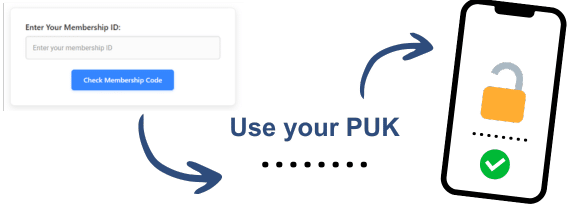
- Enter the PUK number on your device as soon as it appears on the screen or is sent to you via email.
- Follow the prompts and test your phone’s connectivity to make sure the SIM is working back again.
Will I be able to set a new PIN Unlock Key after my SIM Card is PUK Unlocked?
Of course, UnlockHere offers a complete and permanent SIM unlock service, which means that after you follow the step-by-step instructions given before and enter the code into the phone, it’ll be as if it was never locked. You’ll be able to remove this security measure so that you don’t lock your SIM card again or even set a new SIM PIN; in fact, after you finish the unlock, normally the phone itself prompts you to do so!