
Blacklist Unlock UK: Solutions for any Blacklisted IMEI 2026
Is your phone blacklisted in the UK and blocked by carriers like EE, O2, Vodafone, Three, or Virgin Mobile? We provide a professional IMEI blacklist removal service that permanently cleans your device's blacklist status across all UK networks. 100% remote, secure, and effective without physical access to your phone.

✅ Trusted by UK Phone Owners | 🔧 Professional Methodology | 🛡️ Safe & Legal | 📆 Updated
Do you know why your Phone has been Blacklisted?
🤔 Most people think phones are blacklisted only when they're stolen, but that's not actually true! In fact, there are a lot of reasons why this can happen, which we will explain in this section to help you better understand what could be the root cause of this report made by your network provider. 📡
Unpaid Device Plans and Billing Disputes

One of the most common reasons for blacklist activation in the UK is related to overdue payments on device financing plans. Carriers like EE, O2, Vodafone, and Three automatically restrict a phone's IMEI when monthly instalments fall too far behind (even if you purchased the phone second-hand, the blacklist remains tied to the IMEI, not to the new user). 🔒
Reported Theft (Lost or Stolen Phones)

Carriers also block IMEIs when the original owner reports a device as lost or stolen and it's flagged on the CEIR (Central Equipment Identity Register). This is designed to discourage theft, but it also affects many second-hand buyers who unknowingly purchase phones that have been reported on that international blacklist database. 🌍
Fraud-Flagged Purchases and Insurance Claims

This includes insurance claims, identity fraud cases, or purchases made using false information, and in general, all suspicious activities that require an investigation from the mobile carrier or a financial institution. When a claim is approved, the associated device's IMEI gets restricted, and buyers discover this only when they insert a SIM card and see persistent "No Service" messages. 📵
Blacklist Check: The key to tell if a Phone's IMEI is Blacklisted
🔍 Before purchasing a used device or if you suspect your phone is restricted, it's crucial to verify its IMEI status. These verification methods will help you quickly identify whether a phone is blacklisted and save you from potential headaches down the road. ✅
Check if the Phone Has Network Restrictions
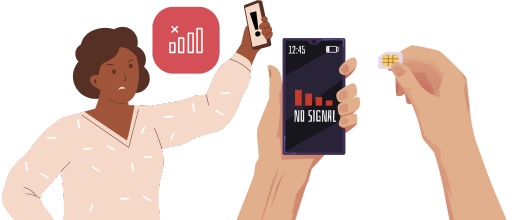
📱 A simple way to detect a blacklist issue is by inserting SIM cards from multiple carriers. If the device shows "No Service," "SIM Not Allowed," or only emergency calls, even with a valid SIM, it may be blacklisted. 🚫 These symptoms appear immediately after the IMEI is added to the CEIR database and will stay in place until the blacklist is removed. ⚠️
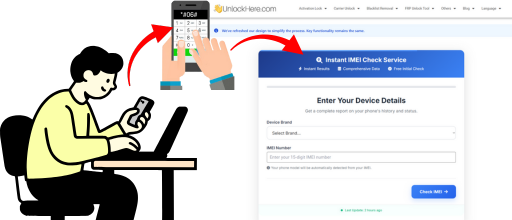
Use an Online IMEI Checker
🔍 Another method is using an online IMEI checker that analyses the device's status directly from network databases via IMEI. These tools can reveal whether the phone has an active blacklist report, outstanding payments, or fraud-related flags. ✅ They are useful when buying a second-hand phone or confirming whether the issue is related to the IMEI and not to your SIM card or local coverage. 📡
Contact Your Carrier to Ask Your IMEI Status
📞 If you live in the UK and are the original owner, your carrier can provide official information about the IMEI status. They can confirm whether a block exists, the reason for it, and whether the device qualifies for removal. 🔓 This step is essential if the IMEI was restricted due to billing issues or an insurance-related claim. Secondary owners may still contact carriers, but information may be limited for privacy reasons. 🔒

How to Unlock a Blacklisted IMEI with UnlockHere's Unlocking Service
🚀 If you want to start the IMEI unlock process for your reported handset, UnlockHere is definitely the #1 third-party unlocking solution you should consider! ⏱️ The typical processing time may vary depending on the carrier and the type of blacklist report, but updates are provided throughout the process, and the unlock of your mobile phone is guaranteed. Follow these steps to remove your IMEI from the UK blacklist database: 🔓
Visit UnlockHere.com (Official Website)
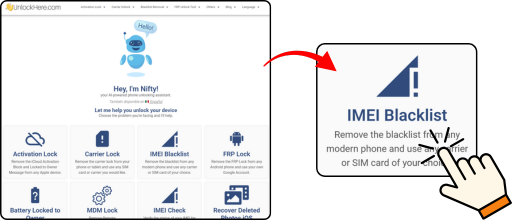
- Visit UnlockHere.com (make sure you have a stable internet connection).
- Click on the "IMEI Blacklist" option.
Enter the Phone's Brand and IMEI
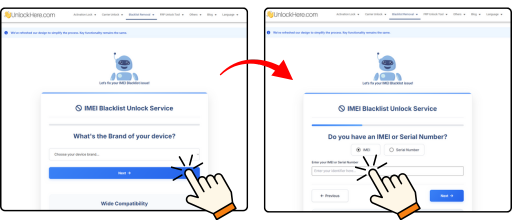
Provide Your Contact Information
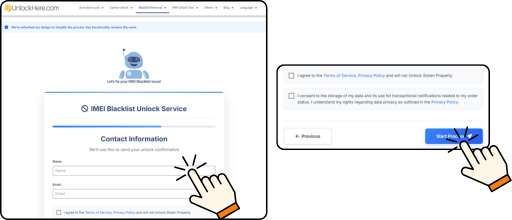
- Enter your name and a valid email address as contact information.
- Submit your request.
Wait Until We Process the Unlock

- Once everything is submitted, Nifty, our AI-powered assistant, will process your IMEI through a secure server-based system.
- Wait while we unlock your device.