AI-Powered PUK Code Generator | Telstra Australia

Fast & Reliable SIM PIN Unlock Service
UnlockHere is your go-to online service for PUK unlocks on all devices and SIM cards in Australia and for all Telstra users! Whether your SIM is locked or your PUK code isn’t working, our expert support team is ready to help you recover access fast.
Telstra SIM PUK Issue? We Have a Solution!
When your PIN fails more than three times, you will get a direct message that says, "Enter your PUK number," but what happens if that code doesn't work or is not the correct one? Before you completely lock your Telstra SIM card, check our online solution and fix that issue for only $2! UnlockHere is ready to assist you, so if you want to know how to unlock SIM card without PUK Telstra, keep reading, as we will unveil all the secrets we have for you.
Don't panic - solution available
Affordable online fix
Learn how without PUK
Ready to unlock your Telstra SIM? Keep reading for the complete guide!
Is There a Difference Between PIN, PUK, and Network Lock?
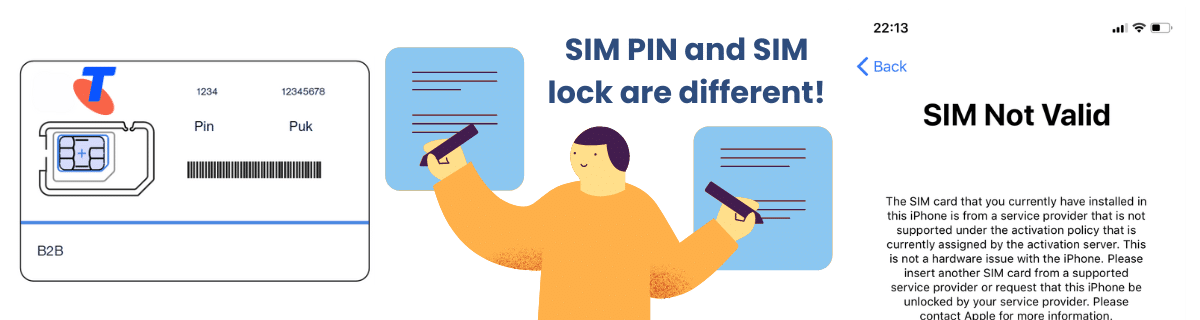
Yes, in this case, each one has a different purpose and has different restrictions. Although they can be similar in some aspects, like locking away some network connections, the biggest difference is that one is a security feature and the other is a carrier policy. There are other things that make you differentiate this lock from the other; for example, the PIN and PUK only affect your SIM card, while a carrier lock affects your mobile phone.
The SIM lock will affect the connection with other network providers in Australia, while the PUK is only used to unlock the SIM if the PIN fails. It’s possible that unlock codes are sometimes referred to as PINs, but in this case, they’re unrelated to the PIN and PUK. The code in question is used to unlock a mobile network, not the SIM card associated with your phone number and contacts.
What is a SIM PIN Number?
The PIN code is a 4 or 8-digit code that protects your SIM card and prevents unauthorized use of your SIM if your phone is lost or stolen. It appears when the phone starts or the SIM is inserted into a new device.
What is a PUK Number?
The PUK is an 8-digit code provided by your carrier (in this case, Telstra) to unlock your SIM after the PIN is entered incorrectly too many times. It is basically a backup method to recover SIM access in case something happens to the original PIN.
What is a Carrier Lock?
The carrier or SIM lock is a restriction set by the phone's original carrier to prevent use with other networks. What it does is keep the device tied to one carrier, and when it's active, you can get messages like "SIM Not Supported" or "Enter Network Unlock Code" when a different carrier's SIM is inserted.
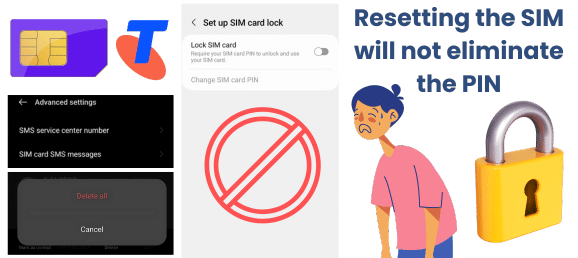
Resetting the SIM Card will Delete the PIN and PUK of your Telstra?
Resetting or doing a default to your Telstra SIM card will not delete or change your existing SIM PIN or PUK code. Telstra’s PUK codes are fixed to each physical SIM, so they can’t be changed or modified by the user… The only one that can assist with a mobile SIM or provide a new SIM if the old one is not working is your current provider; other than that, any attempts to reset or change this number will lock your mobile SIM permanently.

Do I need the PIN and PUK to Activate my SIM Card Every Time?
Only the PIN code, and if you have activated the SIM protection. If you have it set up, then every time you want to do something related to your SIM and mobile service, it will ask for the code, and if you fail three times, then it will ask for the PUK. Other than that, it is not necessary to use these codes to get you connected to the Telstra network.
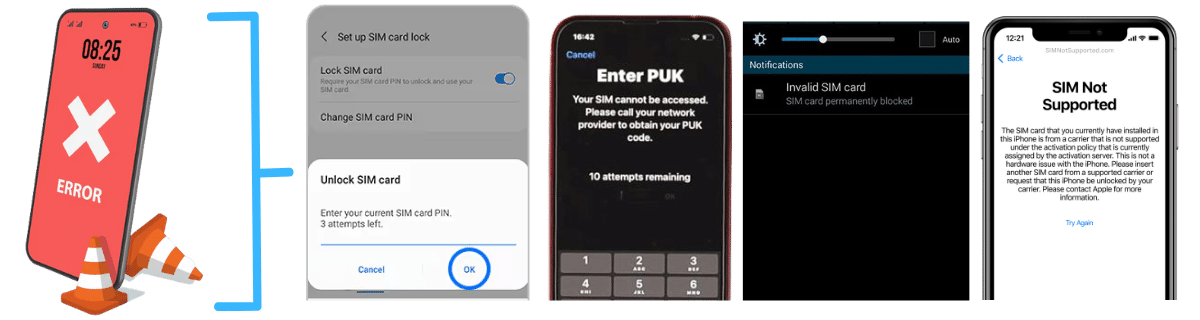
What Errors can you Find while trying to Unlock Your SIM?
"Incorrect PIN"
Wrong SIM PIN entered (1–2 times)
"SIM locked – Enter PUK"
3 incorrect PIN attempts; SIM is locked
"Incorrect PUK"
Wrong PUK entered
"PUK blocked / SIM permanently blocked"
10 incorrect PUK attempts
"Network Locked SIM card inserted"
Phone is network locked to different carrier
"SIM not provisioned" / "SIM not valid"
SIM isn't active, damaged, or not supported
"No SIM card / Invalid SIM"
SIM is not detected or faulty
Can I Get the PUK Code Without Logging In to the Telstra App or Website?
If you don't have a Telstra account, you should be able to get this code by contacting customer service or by checking the SIM package! If you prefer, you can visit a store for assistance or check if a new SIM card with the same number is available, which might be a better option to avoid the issue... Just remember to verify your identity and phone number so the representative can manage your service and provide the PUK or the SIM replacement.

When Is It Safe to Use an External Tool instead of Telstra to Unlock my SIM PIN and PUK?
For this type of issue, it is recommended to use external tool services only when you are unable to retrieve the PUK code and unlock your SIM card. Also, please keep in mind that there can be unsafe sites that can damage your device or infect it with malware, so if you want an online solution, look for one that doesn't affect any configuration inside the chip or phone to work.
UnlockHere, for example, is a great alternative because we don't require extensive information to function, and we are a site that complies with all necessary security measures to operate without issues. Our service is one of the safest online options for this type of issue, and in case something happens, you can contact us at any time so we can provide assistance right away.

How to Unlock SIM Card without PUK Code Telstra

To unlock your Telstra chip without the personal unlock key (PUK), you only need to select the option on our main page that says "PUK Lock." Once you click there, you will be prompted to fill out some info about you and your device, such as your device brand (it doesn't matter if it is Android or iPhone), country, name, email, and phone number. This info will create a unique order, and to activate it, you only need to register with us.
Select PUK Lock Option
Go to main page and click "PUK Lock" option
Fill Device Info
Enter brand, country, name, email & phone number
Register Account
Complete registration to activate your order
Get Temp PUK
Wait for servers to provide temporary PUK code
After completing the registration, you simply need to wait for the servers to provide the temporary PUK code, which will grant you access to your chip. This temporary code allows you to disable or change the current PIN so the SIM is no longer locked away. Don't worry, your original PUK will still be functional, so you can still use the PIN option at any time! Just make sure to have the right PUK.
Your original PUK remains functional - temporary solution only!
As long as your phone is not network-locked to your current carrier, you can change providers without issues, as the PIN and PUK won’t affect the portability of the device to another line. It doesn’t matter if you are having issues with those codes, as you can still use other SIMs for Telstra or other Australian mobile providers without problems.
To find your PUK code with the help of Telstra, you only need to call 13 22 00 and select the option “Unlock device”. You can contact them Monday to Friday from 9 am to 8 pm.
Telstra doesn’t have an option to change the PUK number, so the only option if you are already out of attempts is to replace the SIM and ask them to keep your phone number and mobile plan.